What this page answers
- Which shows demand this check? Those marked Verified Member Only. The requirement sits on the product, and the verification is stored on your account, once — marked performances then need no second passport scan. Which check this is
- What does the scan accept? An original, non-expired passport only. Photos, copies and screenshots are rejected, and NOL World names printed copies and screenshots as forged or altered ID. What the scan accepts
- Declined or Pending Admin Approval — what is the difference? Declined is a failed check you retry through Request to Initialize Submission. Pending Admin Approval means the passport name did not save and waits on a person, up to 24 hours. The statuses
- Can a verification be taken away after it passes? Yes. NOL World names a printed copy, screenshot or altered document, and a passport that has since expired, and says to retry on the existing account rather than a new one. The statuses
- What stops being editable once it passes? Your name, date of birth and email address, because reservations can only be made with the verified information. Only English names are accepted. Names and locks
- Why does the scan keep failing? Four of the published causes are about the capture, not the document: alignment, glare, a face that does not match the passport photo, and a phone not held still for five seconds. What the scan accepts
NOL World runs identity checks at more than one point, and this page is about one of them: the passport scan. NOL World’s own advice is to finish one to two days before the sale, because attempting it close to the opening time can run into heavy traffic.
Which identity check this is
At sign-up. The Terms of Service let the company ask you to verify your mobile phone number or real name through a specialised institution, and hold your application while that check runs.
Before a marked show. The Use Policy describes passport verification through a specialised agency, with failure to complete it able to restrict your use of the service. That is Verified Member Only, and it is what this page covers.
At the venue. Bring a valid photo ID and book in your own name – identity may be checked at the venue, and a stolen or false ID is grounds for restriction.
NOL facepass. On products that carry it, registering your face from the booking details or mobile ticket lets a camera admit you without ticket verification. A registered face cannot be changed.
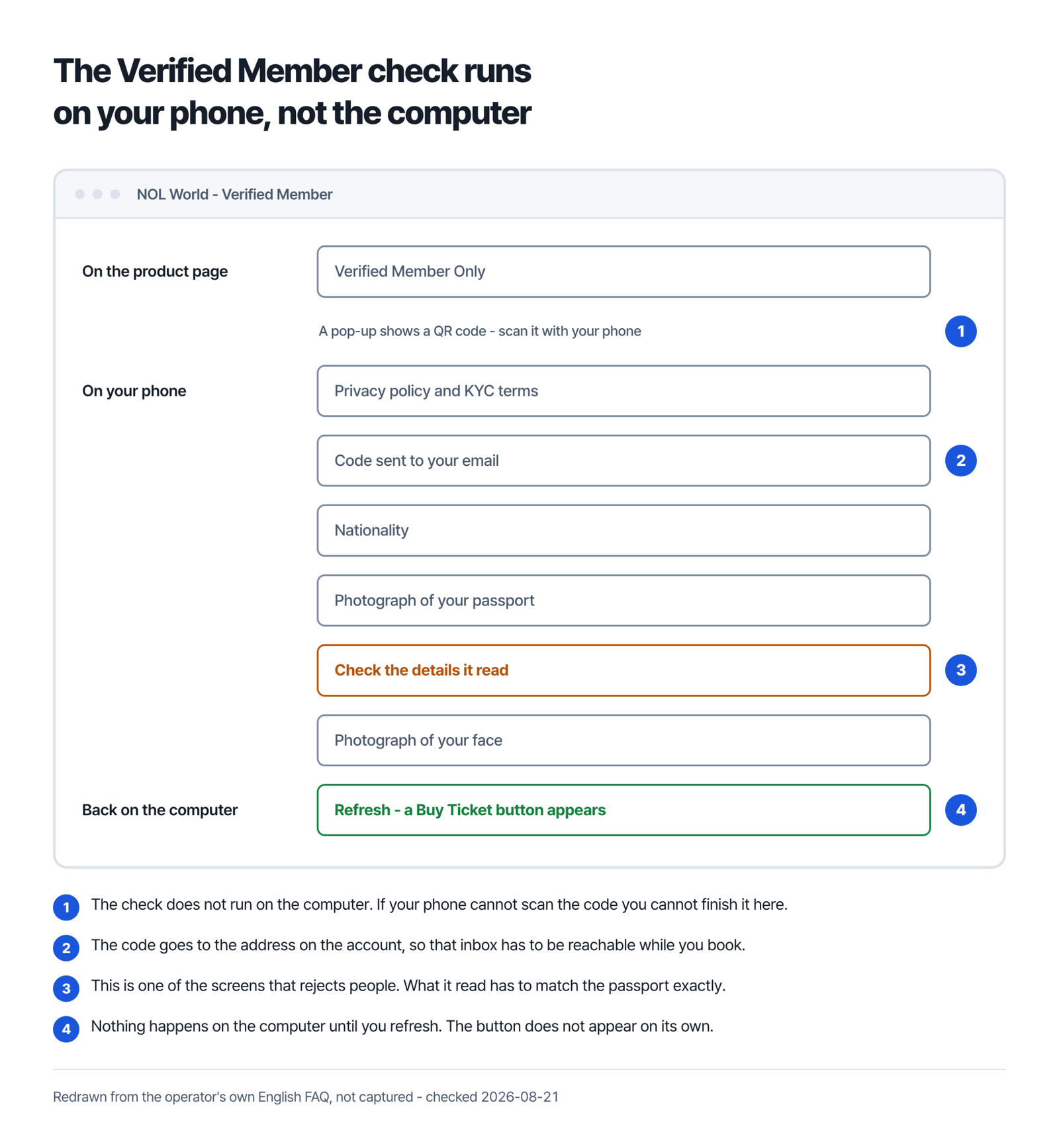
The label sits on the product; the verification sits on your account, once. After it passes, the Buy Ticket button appears on any marked show.
What the scan accepts
The passport has to be the physical document. Printed copies and screenshots count as forged or altered ID.
An expired passport is rejected: NOL World says verification is possible only for valid, non-expired passports.
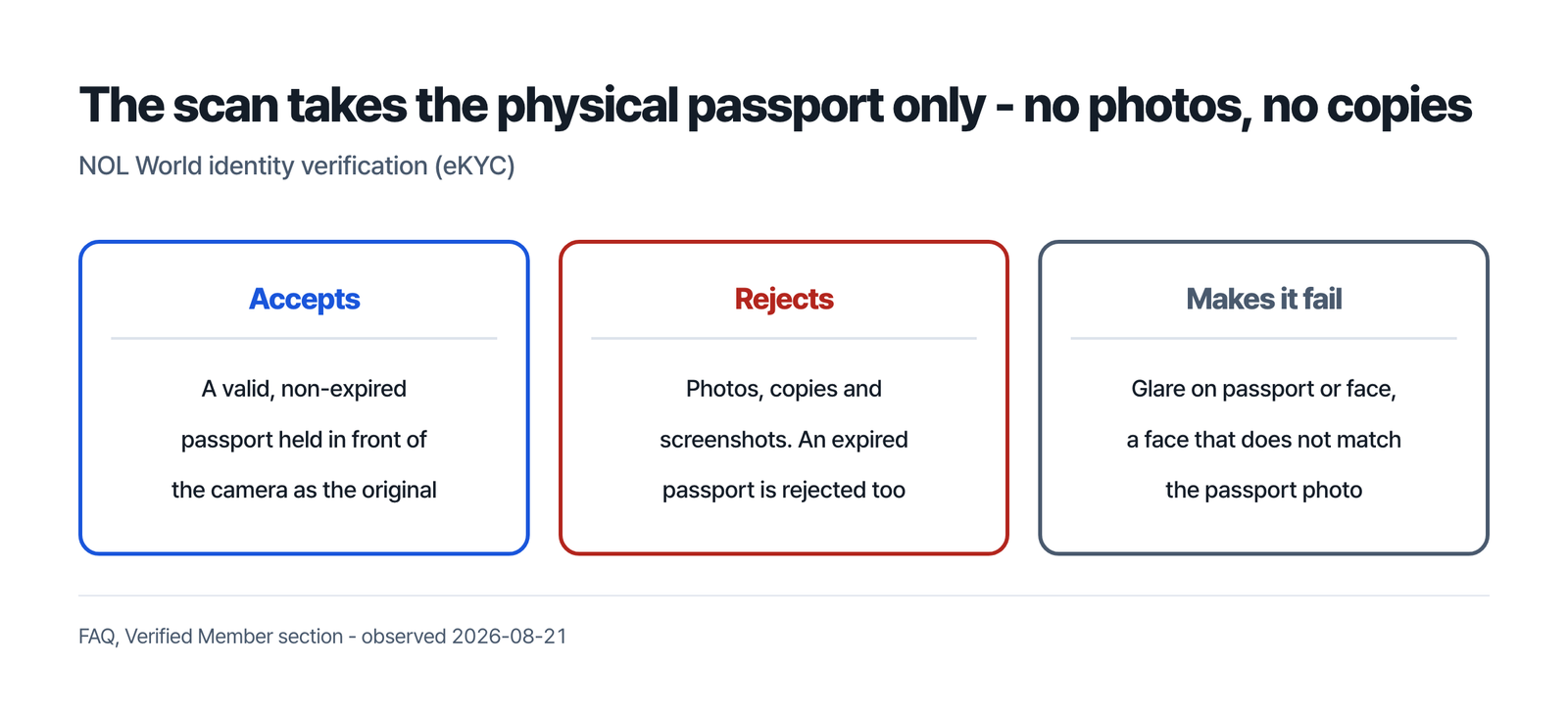
Four of the published failure causes are about the capture, not the document. Align the passport and your face with the on-screen guides. Avoid glare on either, which disrupts recognition. Your face has to match the passport photo. And hold the phone still for at least five seconds, because a low-specification device or unstable connection can fail to save the data.
When it does fail, the screen states the reason. That matters more than it sounds, because the two statuses that appear on My Page afterwards mean different things and take different actions.
Before you start the verification
- An original, unexpired passport.
- A phone with a working camera, on a stable connection.
- The email address on the account, reachable now. A code is sent to it during the process, and NOL World points to the spam folder when it does not arrive.
- The account you actually intend to buy with. The verification binds to one account and cannot be reused on another.
- One to two days before the sale, not the morning of it.
Declined, Pending Admin Approval, and being reset
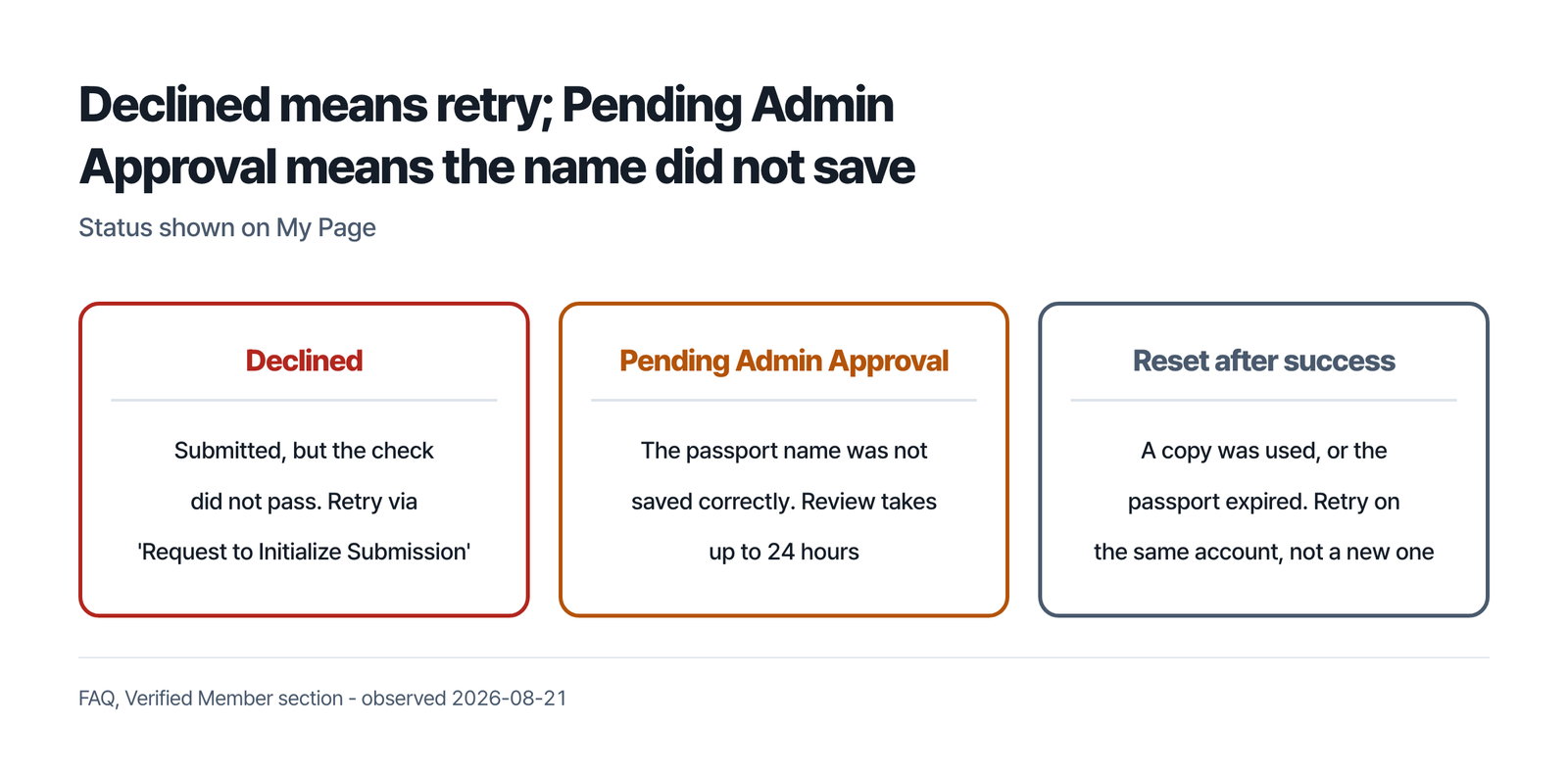
Declined means the submission went through but the check did not pass. NOL World’s route back is a button on the product detail page called Request to Initialize Submission; once an administrator reviews the request, the status updates and verification can be attempted again.
Pending Admin Approval is not a failure of the scan. It means the passport name was not saved correctly and a person has to approve it. NOL World puts that review at up to 24 hours. The reason it gives for booking verification early is traffic near the opening time; a status that waits on a person is a second thing a same-day attempt cannot control.
What reviewers say about that 24-hour figure
- Two NOL World app reviewers describe it passing with nothing decided: one on the Philippine storefront in 2026-02 wrote that 72 hours had gone by, one on the Japanese storefront in 2026-07 that the message stayed up past three days while three inquiries went unanswered.
- Four reviewers between 2026-04 and 2026-06, on the US, Thai, Taiwanese and Indonesian storefronts, describe the scan failing repeatedly – new lighting, new angle, sharper photograph, rejected each time – and one a blank screen after the upload, with hours to wait before another try.
- One of those four writes that they tried three different accounts. NOL World’s instruction runs the other way: retry on the existing account, because a new one can lead to repeated system failures.
- We have not reproduced any of this. These are App Store reviews, with dates, set against the review time and the retry route NOL World publishes.
A verification that has already passed can be cancelled later – a printed copy, screenshot or altered document, or a passport that has since expired. The instruction for what to do next is specific: retry on your existing account, because a new one can lead to repeated system failures.
Names, and what locks after you pass
The name the scan reads is the name you are stuck with. Only English names are accepted, and a passport name that is not in English, or that picks up special characters, stops the reservation and routes you to a name correction request.
Once verification succeeds, three fields stop being editable: your name, your date of birth and your email address. NOL World’s reason is that reservations can only be made with the verified information.
Deleting an account erases the verified information. Accounts restricted for misuse or other violations cannot be deleted.
There is no age limit on the verification itself, though individual products can carry age restrictions.
Cases this check does not serve
- Korean passport holders. The passport scan is not their route; NOL World directs them to the NOL ticket site, and describes a document route through customer support for overseas nationals without a Korean resident registration number.
- Shows without the label. NOL World tells buyers to review the event details for any ticket purchase limits or identity verification requirements, so that page is where you find out.
Do I have to pass the passport check to book anything?
It is mandatory for performances marked Verified Member Only, and NOL World asks buyers to read each event’s details for further identity requirements. Booking also starts from an account: the FAQ’s booking checklist opens with “Set up or log in to your NOL World account ahead of time”, and Article 2 of the Terms of Service says non-members “may be restricted from making reservations or purchases”, with a separate phone or real-name check allowed at sign-up.
The verification email never arrived. What now?
A code is sent to the email address on the account during the process. NOL World’s answer for a code that does not arrive is to check the spam folder and any other mailboxes.
What happens to my verification if I delete the account?
NOL World says deleting an account erases the verified information, and that accounts restricted for misuse cannot be deleted.
My passport name is not in English. Can I book?
Not until it is corrected. Only English names are accepted, and a passport name that is not in English, or that picks up special characters, stops the reservation and routes you to a name correction request.
Interpark Global / NOL World, step by step
Sources
- NOL World, “FAQ” (checked 2026-08-21) – https://world.nol.com/en/my-info/faqs
- NOL World, “Use Policy”, effective 2026-07-28 (checked 2026-08-21) – https://world.nol.com/en/pages/use-policy.html
- NOL World, “Terms of Service”, effective 2026-07-28 (checked 2026-08-21) – https://world.nol.com/en/pages/tos.html
- App Store customer reviews for NOL World, PH storefront (collected 2026-08-21) – https://itunes.apple.com/ph/rss/customerreviews/page=1/id=6476254427/sortby=mosthelpful/json ; JP storefront – https://itunes.apple.com/jp/rss/customerreviews/page=1/id=6476254427/sortby=mostrecent/json
- App Store customer reviews for NOL World, US, TH, TW and ID storefronts (collected 2026-08-21) – https://itunes.apple.com/us/rss/customerreviews/page=1/id=6476254427/sortby=mostrecent/json (`th`, `tw`, `id` likewise)