What this page answers
- Which account do I sign in with? A PAYCO ID, not a Ticketlink one. The guide states the reservation service is not offered to non-members, and one ID cannot serve both the domestic and the global service. The account
- Does it need a Korean ID card? Two documents answer differently. The terms name the date of birth on the resident registration card; the privacy policy’s identity-check line is passport-only. Two documents
- How long do I have at the booking screen? Two separate eight-minute clocks — one to select a seat, one to pay for the seats held. Repeated refreshing during seat or grade selection can close the window. Booking steps
- Can I pay with a card issued outside Korea? The pages read here do not answer it. Article 15 lists seven methods without a brand or issuing country, and all eleven Payment entries in the English FAQ rendered empty on 2026-08-23. Paying
- I booked yesterday. Is cancelling free? Not once the show is inside ten days. Past that the bands apply: 10% from 9 to 7 days before, 20% from 6 to 3, and 30% from 2 to 1. Cancelling
Ticketlink Global is the English booking site NHN LINK Corporation runs at ticketlink.co.kr/global/en. Signing in runs on a PAYCO ID, and the member number, email and mobile number come from PAYCO, so the first task is an account you may not have expected to open.
The account is a PAYCO account, not a Ticketlink one
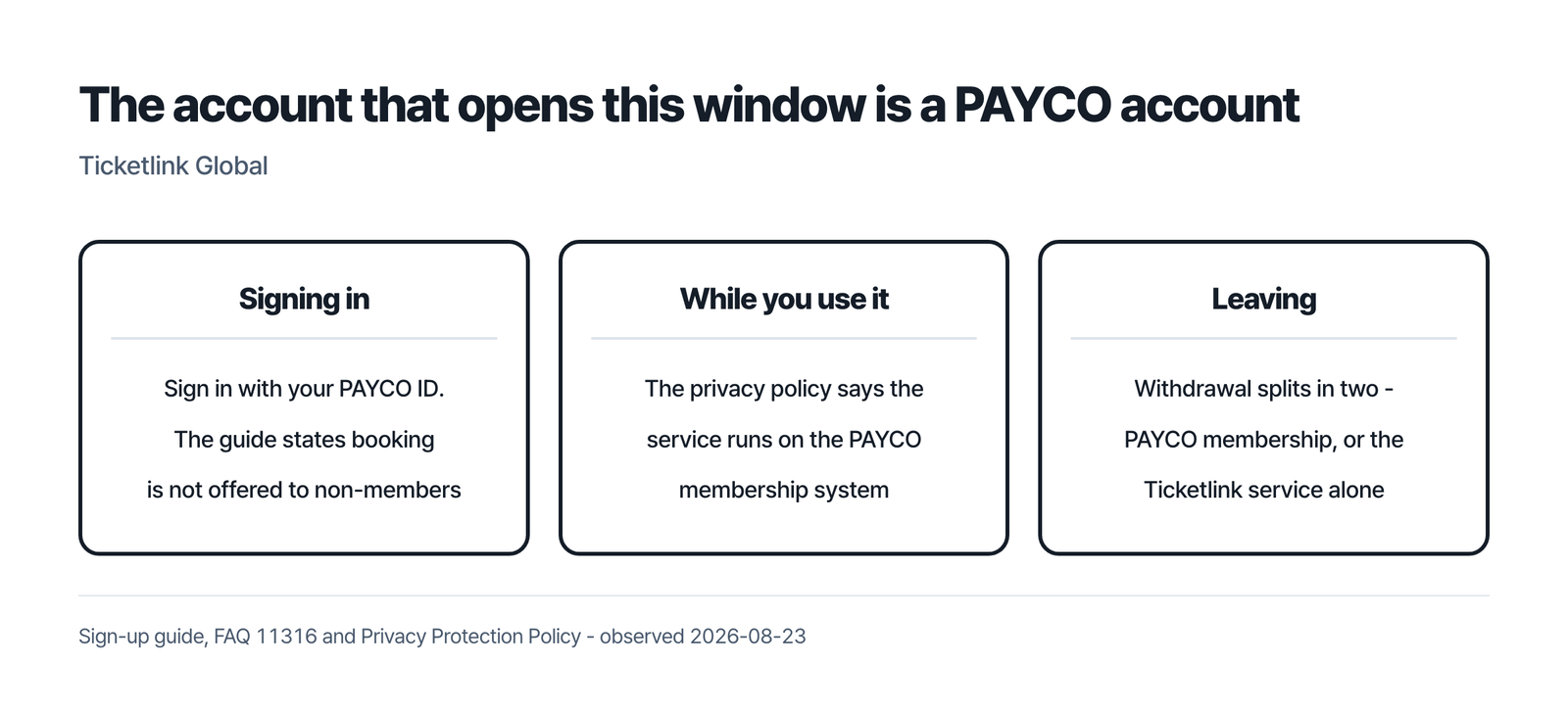
The sign-up guide is plain: sign in with your PAYCO ID. Booking is closed to non-members, so the account exists before anything else does. Creating one starts from Create account under the sign-in box, and you must agree to grant PAYCO access to your personal information.
A ‘Restricted IP’ message can appear at sign-up, login or password recovery. It comes from PAYCO’s anti-theft monitoring, and the only step offered is the CAPTCHA.
Leaving splits the same way. The withdrawal FAQ routes you through Login, My Page, Service Withdrawal, where you choose between PAYCO Membership Withdrawal and Ticket Link Service Withdrawal. The first ends every PAYCO-related service including Ticketlink; the second keeps the PAYCO membership alive, and the privacy policy adds that leaving PAYCO itself must be requested on the PAYCO webpage. Neither exit opens while a booking with an upcoming date or a pending refund is on the account.
Two documents, two answers about the identity check
A reader from outside Korea gets a mixed signal here, so both documents are shown.
Article 16 describes what a purchase takes: account login for members, then the minimum information for purchase and identification. It lists that as the name as shown on passport, mobile phone numbers, and the date of birth on the resident registration card — one sentence naming a passport and a Korean resident registration card together.
The privacy policy describes the check differently. Its collected-items line is a passport: name in English, gender, date of birth, nationality, country of issuance and expiration date, plus an email, a verification identifier and a DI value. Country of issuance and expiry are passport fields, and no resident registration card appears there.
A third page adds a scope the other two do not carry. The FAQ on foreign membership states that signing up for the global service takes no additional identity verification process, while foreigners signing up otherwise go through the same check as domestic users. It also warns that one ID cannot serve both the domestic and the global service.
No page read here says what a visitor without a Korean resident registration card enters at that screen.
What each booking step asks for
The performance tab runs five steps, the sports tab differs at step two, and the exhibition tab has four with no seat selection. The diagrams below reproduce the performance tab, read 2026-08-23 – drawings, not captures.
The five booking steps on the performance tab
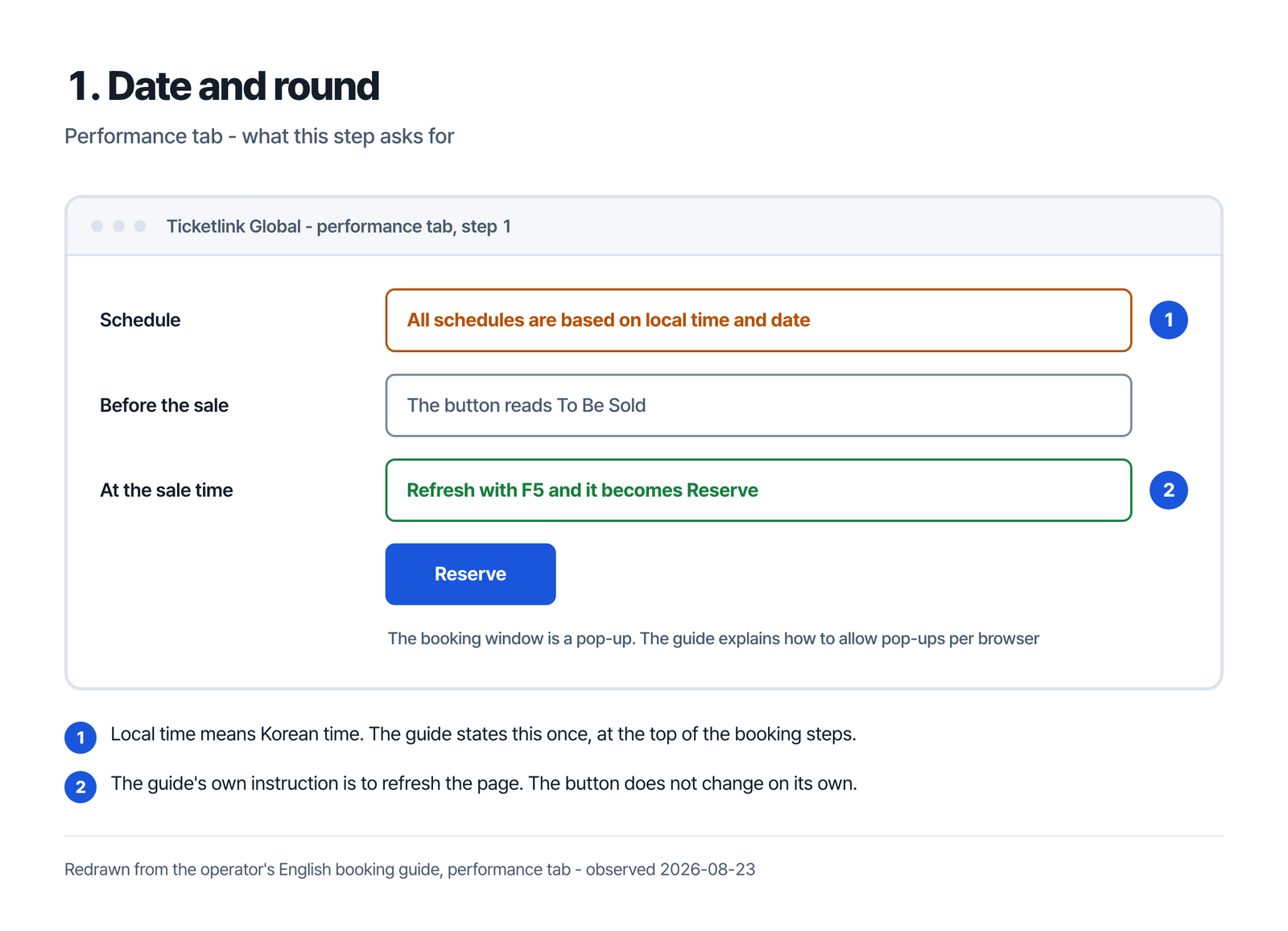
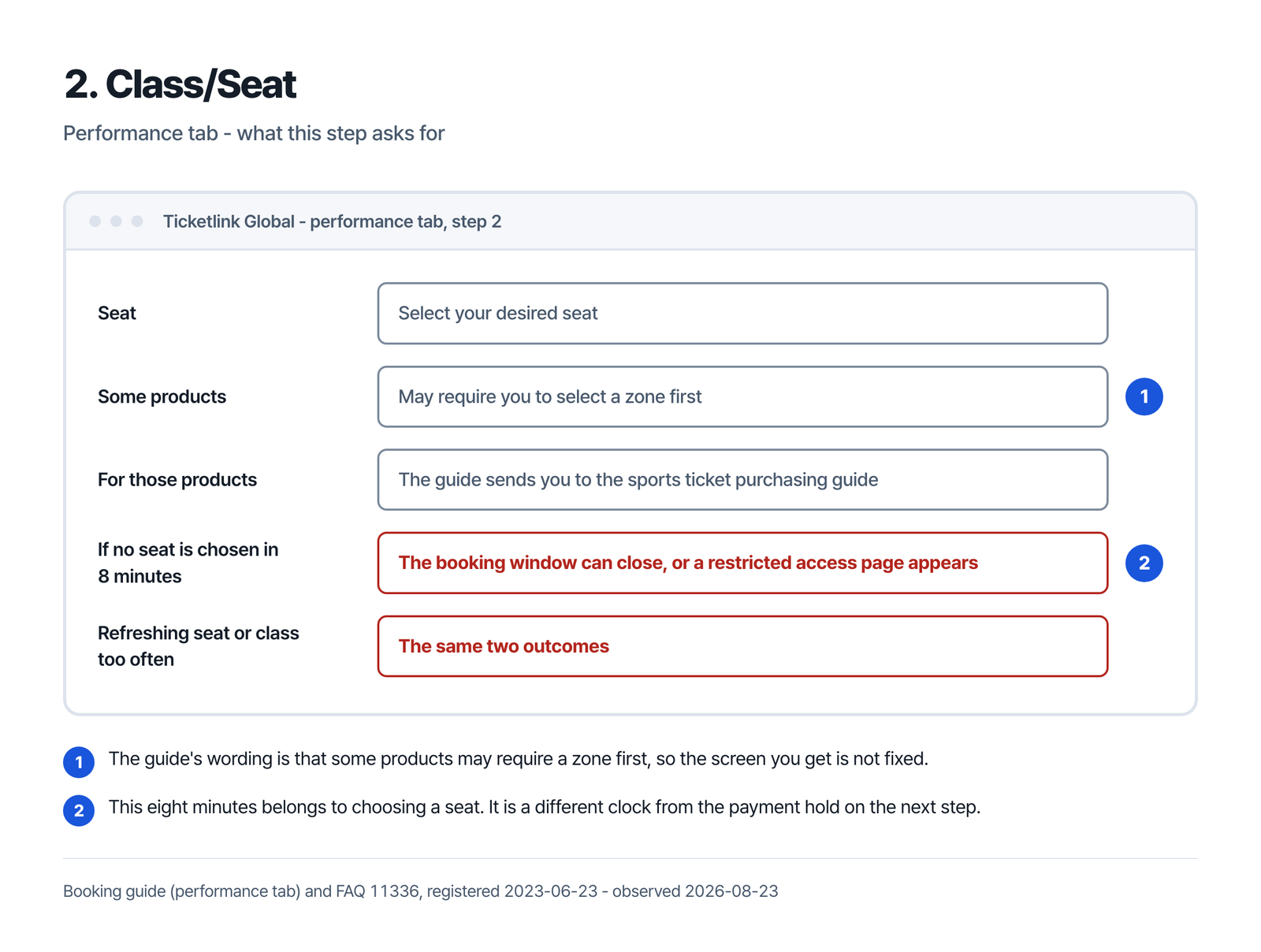
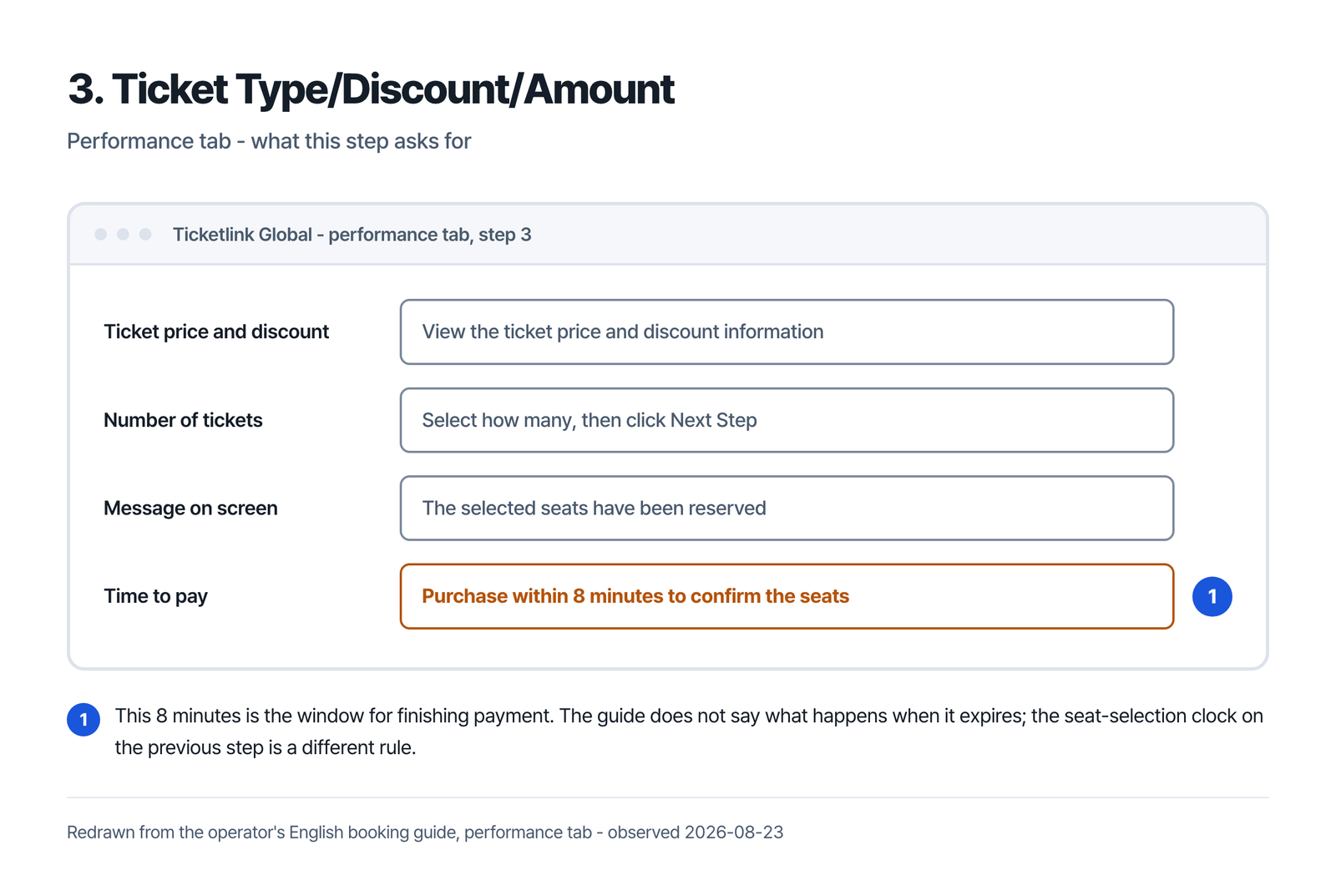
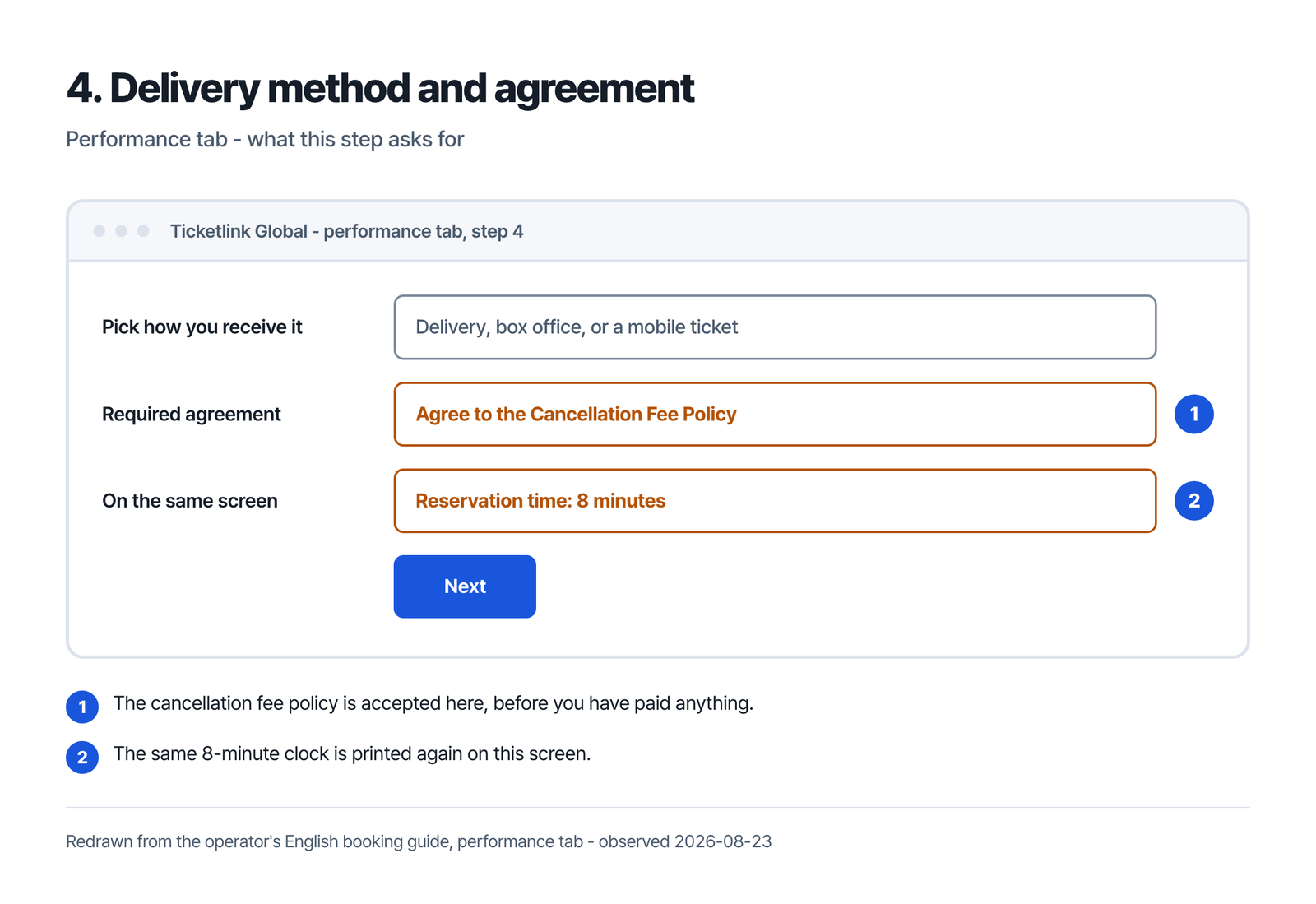
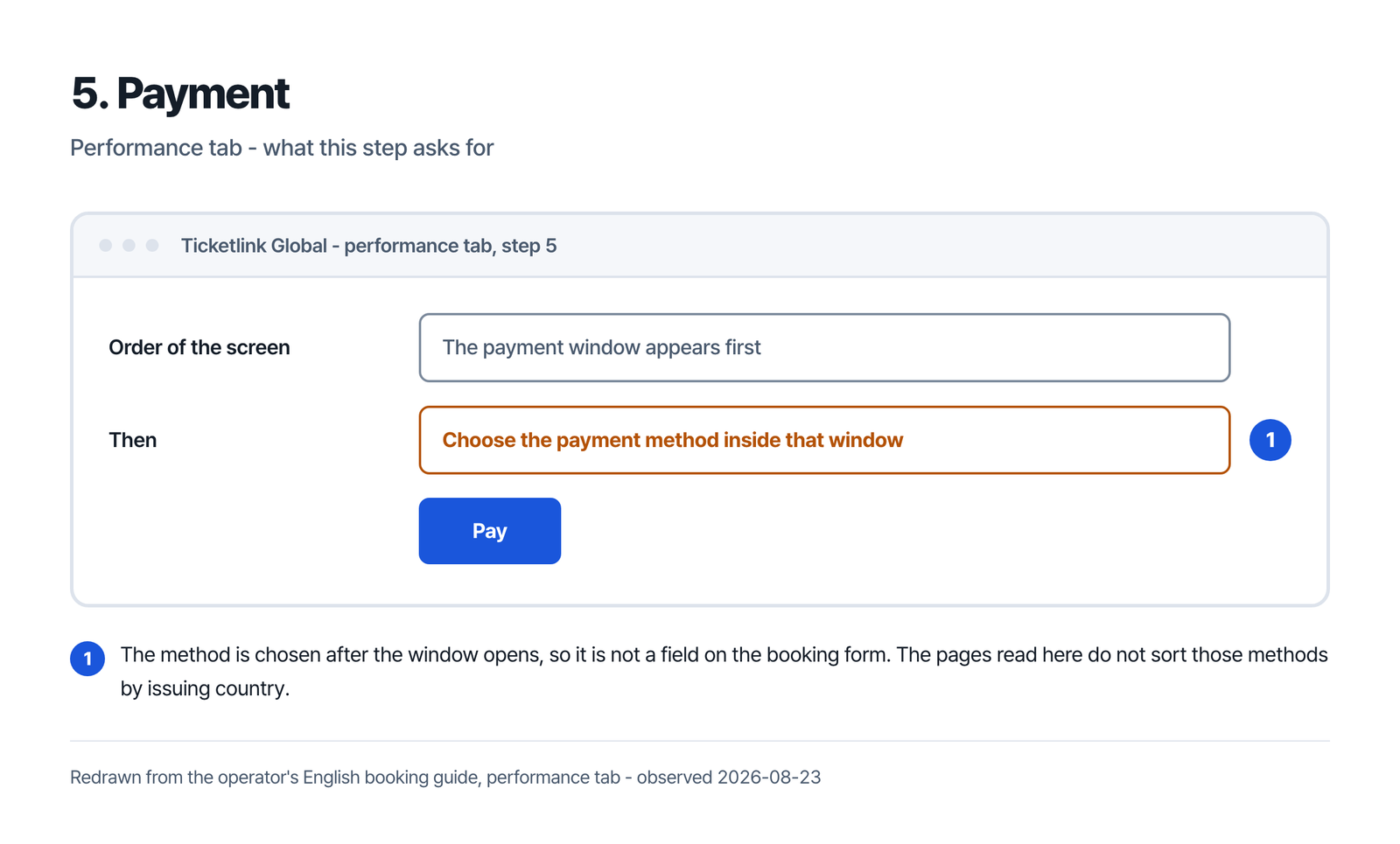
Three details in that sequence are worth knowing before the sale rather than during it.
The first is the clock: the guide states that all schedules are based on local time and date, which means Korean time for a show in Korea. The second is the pop-up. The booking window opens as one, and the guide devotes a block to enabling pop-ups per browser. A blocker that silently swallows it looks exactly like a site that is not responding.
The third is the eight minutes, and there are two of them. The guide’s hold starts once seats are chosen: purchase within eight minutes to confirm them. That is time to finish paying, not to browse, and the same clock is printed again on the delivery screen and at the exhibition tab’s own step two.
A different eight minutes runs earlier, on the seat and class screen. FAQ 11336 states that if the refresh attempt is repeated excessively during seat selection or grade selection, or if no seat is selected within 8 minutes, the booking window may close or a restricted access page may be displayed. That ends a booking before any seat is held.
The pages that appear instead of the booking screen
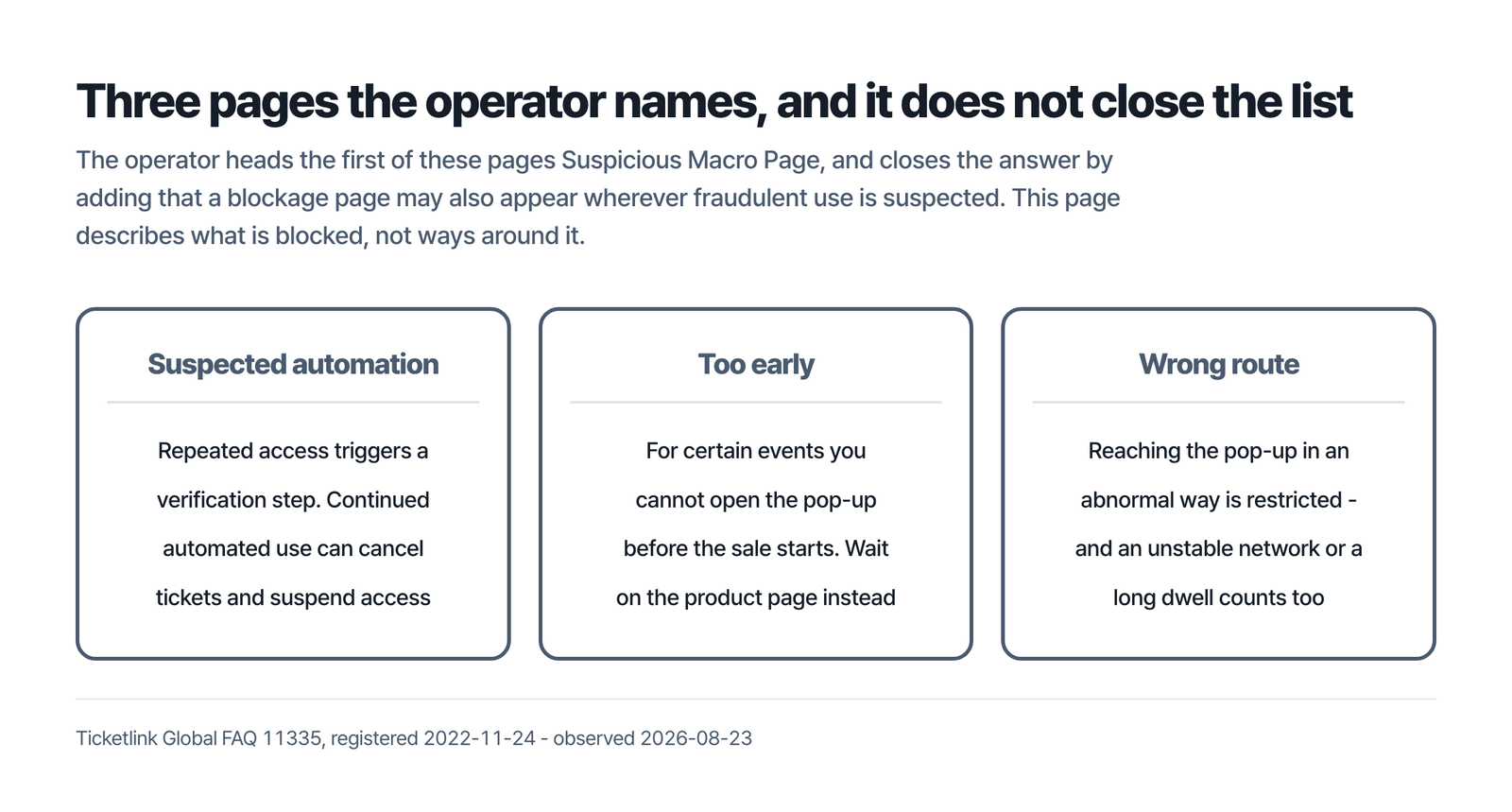
The first is the page for suspected automation: excessive repeated access triggers an authentication step, and use can be restricted for a period if it is not completed. Where continued automated use or suspicious activity is detected, it may apply restrictions such as ticket cancellation and suspension of service access.
The other two are about how you reached the window. For certain events, the FAQ states, you cannot open the booking pop-up before the sale starts; wait on the product information page instead. Reaching it in what the FAQ calls an abnormal way is restricted too, and the fix is to return to the product page and enter through Book Now.
Not every trigger it lists is something you chose. Alongside going straight to the pop-up, it names an unstable network, reconnecting or leaving airplane mode, and staying on the booking page a long time. An ordinary bad connection can produce the same restricted page as a deliberate shortcut. A page may also appear wherever fraudulent use is suspected.
Paying: seven listed methods, and no card brands named on the pages read here
Article 15 lists seven payment methods: deposit without bankbook, credit card, account transfers, advance ticket, mobile phone payment, gift voucher, and any other means Ticketlink finds acceptable. The booking guide’s step five adds only the order — the payment window appears, and the method is chosen inside.
What that article does not do is sort those methods by who issued them. It names a credit card without a brand or an issuing country, as do the booking guides and the pickup guide read here.
All eleven entries under the FAQ’s Payment category were blank on 2026-08-23 – each renders a category label and a registration date with the question and the answer empty, the newest included. Blank entries are not confined to that category. Forty-seven detail pages were opened that day, across the FAQ’s detail-page IDs 11299 to 11345, and forty of them exist. Twenty-six of those forty rendered empty, among them seven of the fourteen filed under Member and six of the seven under Others. Where the answer you need is one of them, the customer centre is 1644-3850, English only.
The booking fee is published, and each figure carries a condition.
| What it is | What the page states | The condition the same page adds |
|---|---|---|
| Booking fee, musical, concert, classical concert, ballet | KRW 2,000 per ticket | The fee may be applied differently depending on the product |
| Booking fee, theatrical play | KRW 1,000 per ticket | As above |
| Booking fee, exhibition | KRW 500 per ticket | As above |
| Refund of the booking fee | Only if you cancel on the day of the reservation | Article 25(2) opens with “Unless otherwise provided per each event”; 25(1) adds that the fee differs by member grade and by internet or call-centre booking |
| Cancelling more than 10 days before the show | KRW 4,000 per ticket for musical, concert, classical and the like; KRW 2,000 for plays, exhibitions and the like | Not to exceed 10% of the ticket sales price. Clause 6 adds that the fee is set differently for each product and that these standards apply unless otherwise specified |
| Cancelling within 7 days of booking | No fee, in accordance with relevant laws | Not if the show is within 10 days. See the next section |
Cancelling: two clocks, and they overlap
Cancelling within seven days of your reservation carries no fee. Cancelling within ten days of the performance date carries one. The bands are 10% of the ticket price from 9 days until 7 days before, 20% from 6 days until 3 days before, and 30% from 2 days until 1 day before. Article 29 states no rate for the performance date itself. Even inside the seven free days, a show that is less than ten days away is charged. Book for a show nine days out and change your mind the next morning, and the second clock governs: you are well within the seven days, and the show is inside ten.
Outside that ten-day zone the fee is a flat amount rather than a percentage, and the table above carries it with the cap Article 29 attaches. On a cheap ticket that cap is what you pay — unless you are still inside the seven days from booking, where clause 5 states no fee at all.
Article 29 attaches several limits to that schedule. Both fee clauses are written for a performance or exhibition product; a sporting-event ticket has its own item, 10% of the ticket price from the day after the reservation until the cancellation deadline. Clause 6 opens by saying the fee is set differently for each product, that the figures apply only unless otherwise specified, and that the Consumer Dispute Settlement Standards take precedence where their deadline applies. And the deadline itself varies by product and can be changed by the organiser, which the FAQ repeats about club and agency policies. You agree to it while booking, and afterwards it appears on the My Page reservation details page; FAQ 11305 adds that after it passes the booking cannot be cancelled at all.
Several smaller rules decide whether a cancellation works at all. Partial cancellation needs a credit-card payment and is refused on combined ones, and FAQ 11304 adds that some tickets do not allow it at all. Some changes to the date, seat, grade or payment method are not possible within the same product. The route is then to cancel and rebook, risking the booking fee and a cancellation fee, with no promise of the same seat. Once a ticket has been posted, online cancellation stops: it has to come back before the deadline, and the fee is set by the date it arrives. Delivery charges are not refunded on a cancelled shipped ticket, and a lost or damaged ticket can never be cancelled or changed. Where a refund follows a problem with the event, no fee is deducted, and the refunding party may be the organiser.
Getting the ticket
The pickup guide sets out four routes, and each carries a condition worth reading before you pick one at step four.
Two documents measure delivery differently. The pickup guide says within ten business days of completing the reservation, marked Domestic, excluding weekends and holidays and possibly a day longer for regional reasons or absence. Article 26(2) instead has the ticket dispatched the day after payment, with a standard arrival of ten days from there, and adds that some goods follow a separate delivery principle such as collective delivery on a set day. Once the status reads Preparing for delivery the address is fixed. The guide adds that your choice of delivery method may be limited by operator or club policy, or by the date of the event. Whether this window posts abroad is not answered on the pages read here.
On-site pickup takes the confirmation SMS or your ticket number at the box office on the day. For performances and exhibitions the window runs from one hour to thirty minutes before the start, narrower at the back end than it looks. The guide adds that on-site pickup may be limited by venue policy or by the date of the event, and recommends printing the reservation details; without the printout, or without the reservation number, its FAQ allows an ID card instead. At sports venues the ticketing machines ask for the reservation number and a date of birth as recorded on a resident registration document.
The two mobile options carry the sharpest conditions. A Home Ticket admits you by barcode with no ticketing step, but the whole booking must enter together, some products do not offer it, and it is withheld where proof of attendance is required. A Smart Ticket may not be available at all, depending on the product. Where it is, it issues from your phone: for sports the guide reads from 2-3 hours before the day of the event, from midnight for a same-day ticket, and any time inside an exhibition’s run. The guide attaches a parenthesis to that period which reads that tickets can be issued after the ticketing deadline and cannot be cancelled. It is also unavailable if paper tickets already reached you.
What this page does not settle, and where it stops
The English pages read here leave these unanswered. Whether a card issued outside Korea is accepted: Article 15 names methods without naming issuers, and the eleven Payment FAQ entries were blank. Whether a non-Korean mobile number is accepted: no page read here names a country. Whether tickets are posted outside Korea, since the ten-business-day figure is marked Domestic.
This page covers the official route only, not automated purchasing, ways around a queue or a restricted-access page, accounts in another person’s name, or resale. Ticketlink states that continued automated use or suspicious activity can lead to cancelled tickets and suspended access, reported here as the operator’s own rule.
Do I need a Ticketlink account?
You need a PAYCO ID. The guide states that the reservation service is not offered to non-members, so the account has to exist before the sale opens, and the FAQ warns that one ID cannot serve both the domestic and the global service.
Does Ticketlink Global need a Korean ID card?
The documents differ. Article 16 names the passport name, a mobile number and the resident-registration date of birth together; the privacy policy’s identity-verification line is passport-only, down to country of issuance and expiry.
Can I pay with a card issued outside Korea?
The pages read here do not answer it. Article 15 lists seven methods without naming a brand or an issuing country, and all eleven Payment entries in the English FAQ rendered empty on 2026-08-23.
I booked yesterday for a show eight days away. Is cancelling free?
No. The no-fee rule for cancelling within seven days of booking stops applying once the show is inside ten days, and Article 29(6)(3) and FAQ 11303 both say so. Eight days out falls in the schedule’s first band, 10% of the ticket price — unless the product sets its own, since clause 6 states the fee is set differently for each product and that its figures apply unless otherwise specified. Push the same booking out past ten days and clause 5 applies instead, with no fee. The deadline itself varies by product and can be changed by the organiser, so read it on the My Page reservation details first.
Every page below is Ticketlink Global’s own, read 2026-08-23
- “Sign in and Sign Up” guide – https://www.ticketlink.co.kr/global/en/help/guide/signup
- “Term of Use Agreement”, Articles 15, 16, 25, 26, 29 and 30 – https://www.ticketlink.co.kr/global/en/policy/usage
- “Privacy Protection Policy” – its own English text states the translation is for reference only and that only the Korean version is legally binding – https://www.ticketlink.co.kr/global/en/policy/privacy
- “Purchase tickets” guide, performance tab – https://www.ticketlink.co.kr/global/en/help/guide/reservation/concert
- “Purchase tickets” guide, sports tab – https://www.ticketlink.co.kr/global/en/help/guide/reservation
- “Purchase tickets” guide, exhibition tab – https://www.ticketlink.co.kr/global/en/help/guide/reservation/exhibition
- “Pick Up Tickets” guide – https://www.ticketlink.co.kr/global/en/help/guide/ticket
- FAQ 11317, foreign membership (registered 2022-06-17) – https://www.ticketlink.co.kr/global/en/help/faq/11317
- FAQ 11316, membership withdrawal (registered 2022-06-17) – https://www.ticketlink.co.kr/global/en/help/faq/11316
- FAQ 11305, cancellation deadline (registered 2022-06-16) – https://www.ticketlink.co.kr/global/en/help/faq/11305
- FAQ 11303, cancellation fee (registered 2022-06-16) – https://www.ticketlink.co.kr/global/en/help/faq/11303
- FAQ 11304, partial cancellation (registered 2022-06-16) – https://www.ticketlink.co.kr/global/en/help/faq/11304
- FAQ 11337, reservation fee (registered 2024-02-01) – https://www.ticketlink.co.kr/global/en/help/faq/11337
- FAQ 11335, restricted access (registered 2022-11-24) – https://www.ticketlink.co.kr/global/en/help/faq/11335
- FAQ 11336, restricted access during booking (registered 2023-06-23) – https://www.ticketlink.co.kr/global/en/help/faq/11336
- FAQ 11329, restricted IP at sign-up or login (registered 2022-06-24) – https://www.ticketlink.co.kr/global/en/help/faq/11329
- FAQ 11323, where to retrieve tickets (registered 2022-06-24) – https://www.ticketlink.co.kr/global/en/help/faq/11323
- FAQ index and every detail page from 11299 to 11345 (opened one by one) – https://www.ticketlink.co.kr/global/en/help/faq
- “Service Center” index – https://www.ticketlink.co.kr/global/en/help/main