What this page answers
- Can I log in with my existing YES24 account? No. Existing YES24 members sign up again, your email address becomes the ID, and the link sent by Verify Email Address is valid for only 1 hour. The account
- I hold a Korean passport. Can I pass Verified Member Only? No. The check takes a physical foreign passport only, and lists Korean passports, national ID cards of any country, driver’s licenses and passport copies or photos as not accepted. The identity check
- Will Call or overseas delivery — when do I decide? During booking. DHL carries all overseas shipments, shipping to Russia is not possible, Iran is excluded, and a Brazilian address needs the recipient’s CPF number. Getting the ticket to you
- Does sign-up need a Korean phone number? The only field the sign-up screen renders is the email address; the privacy policy lists ID(email), password, name and date of birth as the sign-up items, and neither names a phone number. The account
This page covers only what happens before a seat is selected: registering, proving who you are, and choosing how the ticket gets to you. Paying and cancelling are separate pages in this series.
YES24’s English FAQ warns that the Global YES24 TICKET site is different from global.yes24.com and that the two do not share member information.
The account does not carry over
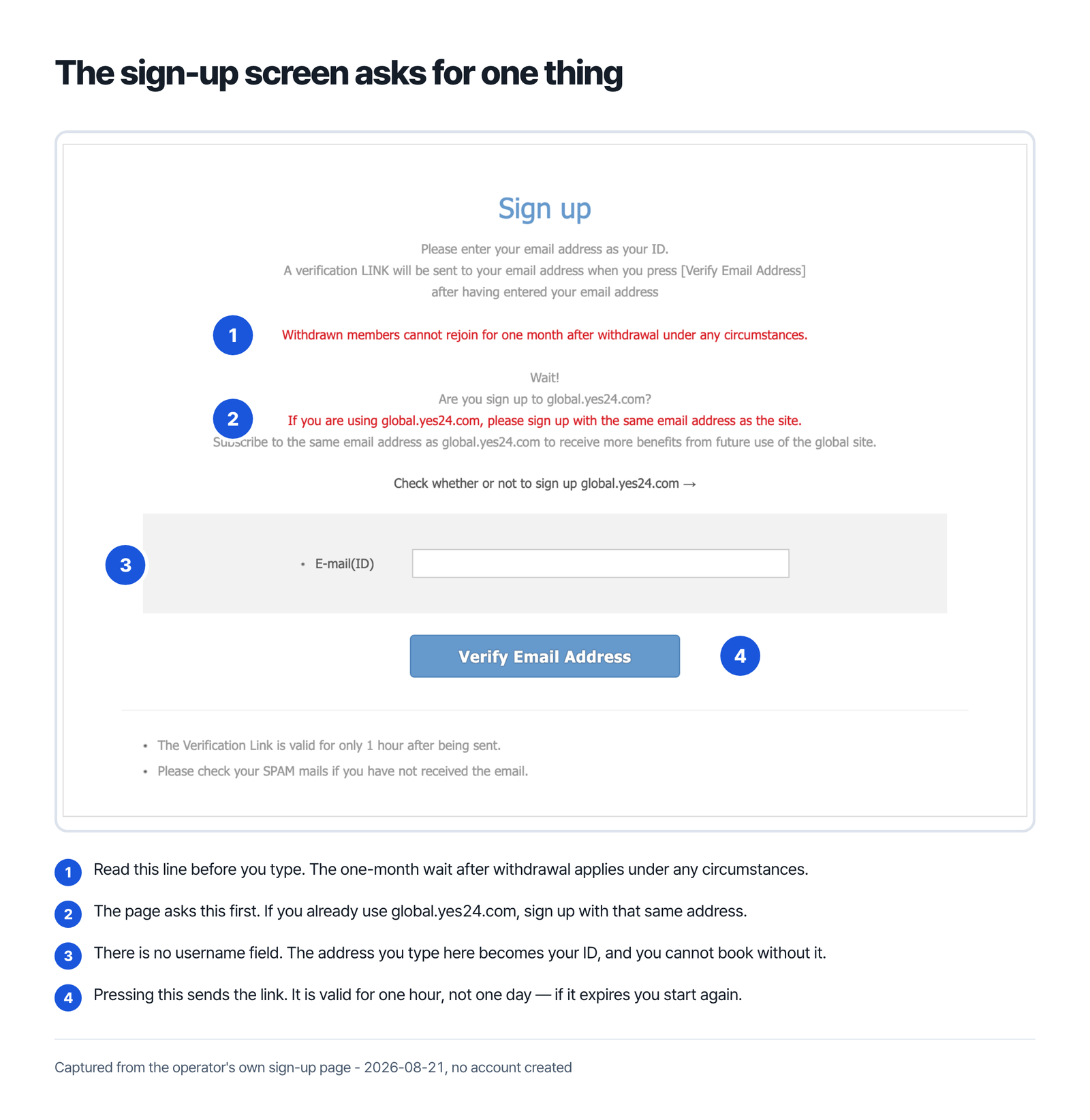
Though you are existing members of YES24, the FAQ says, if you want to use the Global YES24 TICKET site, you should sign up again. There is no guest checkout either — booking a ticket is only available for members, and the page tells you to sign up first.
Registration itself is short. The sign-up page asks you to enter your email address as your ID, then sends a verification link when you press Verify Email Address. The link is the part that catches people out: it is valid for only 1 hour after being sent, and YES24 suggests checking your spam folder if it does not arrive.
One rule is worth reading before you close an account you no longer want. Withdrawn members, the page states, cannot rejoin for one month after withdrawal under any circumstances.
Verified Member Only: the check that refuses Korean passports
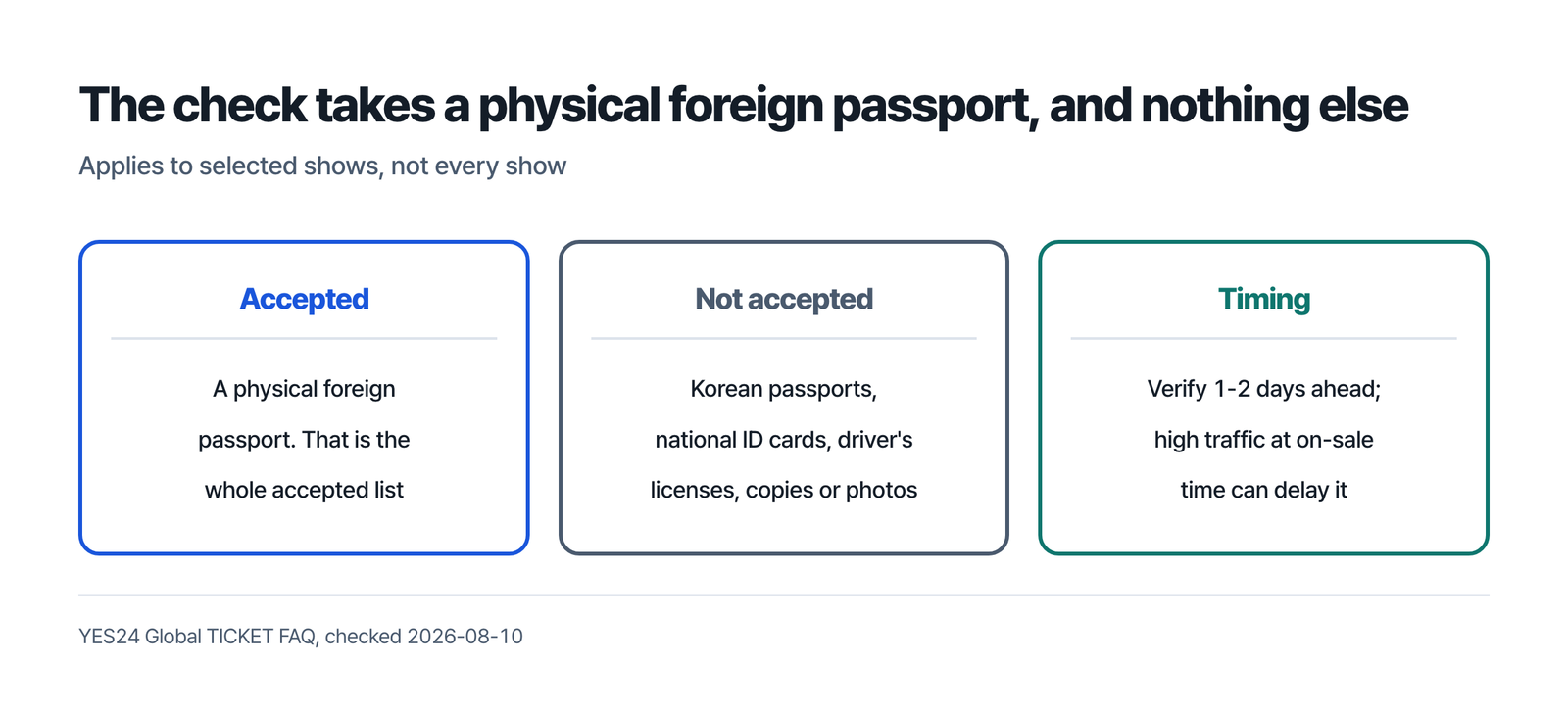
Some shows sit behind an extra gate. YES24 describes Verified Member Only as a member-exclusive identity verification service, an eKYC step, and only members who complete it can buy tickets for the shows that carry it.
What it accepts is narrow. The accepted document is a foreign passport — and only a physical one. The page lists what it will not take: Korean passports, national ID cards of any country, driver’s licenses, and passport copies or photos. The same answer sends Korean passport holders elsewhere: it tells them to use YES24 ticket, the Korean site.
Do not leave this until the on-sale minute. YES24 warns that attempting verification right before ticket sales may cause delays due to high traffic, and advises completing it at least one to two days in advance.
Two consequences follow. First, five fields are frozen afterwards: name, date of birth, email, nationality and gender cannot be changed once verified — so enter them as they appear in your passport. Second, YES24 describes a separate route for Korean nationals living abroad, who can receive a dedicated authentication URL after confirming their residency status through the customer centre.
Decide how the ticket reaches you
This is a preparation question, not a delivery-day one, because the choice is made during booking and the window to change it closes early.
Two routes exist. Will Call means collecting at the venue, and will-call tickets can only be collected by the ticket holder, unless the show’s own policy says otherwise. To collect, you present your physical valid ID card — the page names a passport — together with your record of booking confirmation. If your YES24 account name differs from your passport name, the FAQ warns, you can have trouble taking the ticket at the venue.
The other route is overseas delivery, and its limits are specific. DHL delivers all overseas shipments. Whether a show offers overseas delivery at all varies by performance, and the fee varies by destination country. Customs tax is the recipient’s responsibility. Shipping to Russia is not possible, Iran is excluded as well, and a Brazilian address needs the recipient’s CPF number written next to it.
If nobody claims a delivered package, YES24 says it may be discarded when the customer does not claim it or is out of contact within five days of its arriving.
Changing your mind about collection is bounded. The FAQ says the method can be changed between Will Call and overseas delivery, but that switching to overseas delivery is only available until 20 business days before the performance.
Have these ready before the on-sale time
- An email address you can open within an hour of pressing Verify Email Address.
- Your name, date of birth and nationality exactly as printed in your passport.
- Your physical passport, if the show is marked Verified Member Only — verified one to two days ahead, not on the day.
- A decision on Will Call or overseas delivery. If you choose shipping, the FAQ asks for the recipient name and all delivery information in English, for customs clearance.
- The show’s own page. Booking closes at 5 pm the day before a Tuesday-to-Saturday show, and at 11 am on Saturday for a Sunday or Monday show, with a limit of 10 tickets per person at one time. The FAQ adds that each event may have different due dates and ticket available numbers. Its collection rule breaks off the same way: after stating that only the ticket holder can collect a will-call ticket, the answer continues “But, each show can be operated by different”. Treat the booking window, the ticket limit and the collection arrangements as defaults the show page can override.
What this page does not cover
This series does not explain how to get around an identity check, a queue, or a purchase limit, and it does not cover resale. YES24’s verification step exists to tie a booking to a named person, and working around it would mean booking under someone else’s identity.
Sold-out shows also stay sold out. Preparing properly means you are not stopped by a form — it does not reserve a seat.
I already have a YES24 account. Can I use it?
Not on the global ticket site. The FAQ says existing YES24 members should sign up again to use the Global YES24 TICKET site, and booking is only available for members.
What gets locked once the passport check passes?
Five fields. YES24 states that name, date of birth, email, nationality and gender cannot be changed after verification, so enter each of them exactly as the passport prints it.
I hold a Korean passport. Can I pass Verified Member Only?
No. The accepted document is a foreign passport only, and Korean passports are listed among the documents not accepted. YES24 describes a separate customer-centre route for Korean nationals residing abroad, who receive a dedicated authentication URL once their residency status is confirmed.
Can I have the ticket posted to a friend in Korea?
Not from a global booking. YES24 states it does not offer a domestic delivery service if the booking was made from the global site.
YES24 Global TICKET, step by step
- The platform
- Account and identity
- Payment
- Cancel and refund
Sources
- YES24 Global TICKET, “FAQ” (checked 2026-08-10, the Verified Member and overseas delivery answers re-read 2026-08-27) – https://ticket.yes24.com/English/FAQ
- YES24 Global TICKET, “Sign up” (read in a browser 2026-08-21, re-opened 2026-08-27) – https://ticket.yes24.com/Pages/English/Member/FnSignUp.aspx
- YES24 Global TICKET, “Purchase guide” (checked 2026-08-10) – https://ticket.yes24.com/English/Guide
- YES24, “Privacy Policy”, effective December 1 2025 (read in a browser 2026-08-21) – https://ticket.yes24.com/Pages/English/Guidance/FnPolicy.aspx